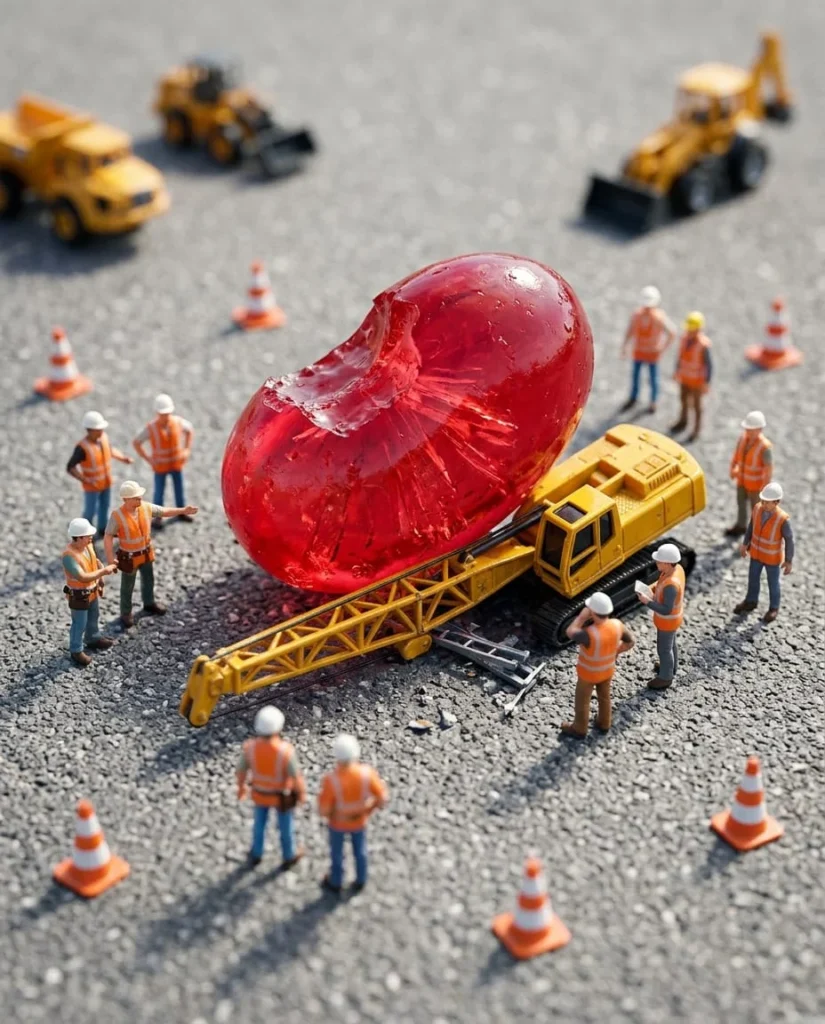
You will make a high-detail miniature scene where a giant jellybean crashes into a tiny construction site. The contrast between the professional worker's focus and the absurd scale of the candy creates an instant laugh.
Why it is trending
Tilt-shift photography is visually satisfying. Combining it with fail humor and oversized food creates high-contrast imagery that performs well on social feeds.
The master prompt
Copy it as it is, or change the parts in [BRACKETS] to make it yours.
A hyper-realistic tilt-shift macro photograph of a miniature street construction scene. The subjects are tiny plastic construction workers wearing neon orange high-visibility vests and miniature white hard hats. Their expressions are focused and professional. In the center of the frame, a massive, translucent [COLOR] jellybean with a visible half-moon bite mark has fallen from above, crushing a small yellow construction crane. The crane is bent at a 45-degree angle under the weight of the candy. The setting is a grey asphalt miniature road with tiny white painted lines and miniature orange traffic cones. Shot from a high angle using a 35mm macro lens, f/2.8, creating a shallow depth of field where the top and bottom of the image are softly blurred. Lighting is bright, natural midday sunlight with soft, realistic shadows. The color palette is dominated by safety orange, caution yellow, and the vivid, glowing translucency of the jellybean. Cinematic quality, 8k resolution, extreme detail on the plastic textures and the sugary surface of the candy.
Short version (for apps with a character limit)
Tilt-shift macro photo of tiny construction workers in orange vests. A giant [COLOR] half-eaten jellybean crushes a yellow miniature crane on a grey street. Hyper-realistic, bright daylight, vivid colors, shallow depth of field, 8k.
What to avoid (negative prompt)
real people, humans, brands, logos, trademarks, blurry center, deep depth of field, distorted faces, gore, text, watermark
Remix it: ready-made variations
Winter Chaos
A hyper-realistic tilt-shift macro photograph of a miniature snowy city street. Tiny plastic workers in orange winter gear and hard hats stand around a massive, translucent blue jellybean that has crashed into a miniature snowplow. Soft, overcast winter lighting, cool blue and white color palette, shallow depth of field, 35mm macro lens.
Park Disaster
A hyper-realistic tilt-shift macro photograph of a miniature city park. Tiny plastic workers in neon vests are attempting to move a massive, translucent green jellybean that has landed on a miniature park bench and a tiny fountain. Bright sunlight filtering through miniature trees, vibrant green and yellow tones, shallow depth of field, 35mm macro lens.
The Pile-Up
A hyper-realistic tilt-shift macro photograph of a miniature highway. A dozen different colored, half-eaten jellybeans have fallen, creating a massive candy pile-up that traps several tiny yellow construction trucks. Tiny workers in orange vests look on in shock. High angle, bright daylight, vivid multi-colored palette, shallow depth of field, 35mm macro lens.
Tips for each AI model
| Model | What to do |
|---|---|
| Midjourney v7 | Use –stylize 250 to keep the realism high without making it look too digital. |
| Flux | Emphasize 'plastic texture' and 'translucent sugar' to get the materials right. |
| Ideogram | Specify 'macro photography' at the start of the prompt for better scale accuracy. |
| Grok Imagine | Focus on 'tilt-shift' and 'high angle' to ensure the miniature effect is strong. |
How to make it, step by step
- Pick your candy Decide on the jellybean color in the [COLOR] bracket to set the mood.
- Generate base image Run the master prompt in Midjourney v7 or Flux.
- Refine depth If the blur isn't strong enough, add 'extreme tilt-shift' to the prompt.
- Upscale Use a creative upscaler to bring out the plastic and sugar textures.
Posting kit
A caption and hashtags you can use when you share your version.
When the snack break goes horribly wrong. 🍬🏗️

Array
Questions
How do I make the jellybean look more realistic?
Use words like 'translucent', 'subsurface scattering', and 'sugary texture' to tell the AI how light should pass through the candy.
Can I change the workers to something else?
Yes. Replace 'construction workers' with 'tiny firefighters' or 'miniature police officers' and change the 'yellow crane' to a 'tiny fire truck'.
Why is my image too sharp everywhere?
Ensure you include 'tilt-shift' and 'shallow depth of field' in the prompt. This tells the AI to blur the top and bottom of the frame.