Upload your photo, pick a costume, and get a cinematic Halloween portrait with candlelight, fog and pumpkins, without buying a costume. Halloween AI portraits are one of the top seasonal searches, and this prompt keeps it elegant rather than tacky.
Why it is trending
With Halloween this month, 'AI Halloween costume' searches and posts are at their yearly peak on Instagram, Facebook and TikTok.
The master prompt
Copy it as it is, or change the parts in [BRACKETS] to make it yours.
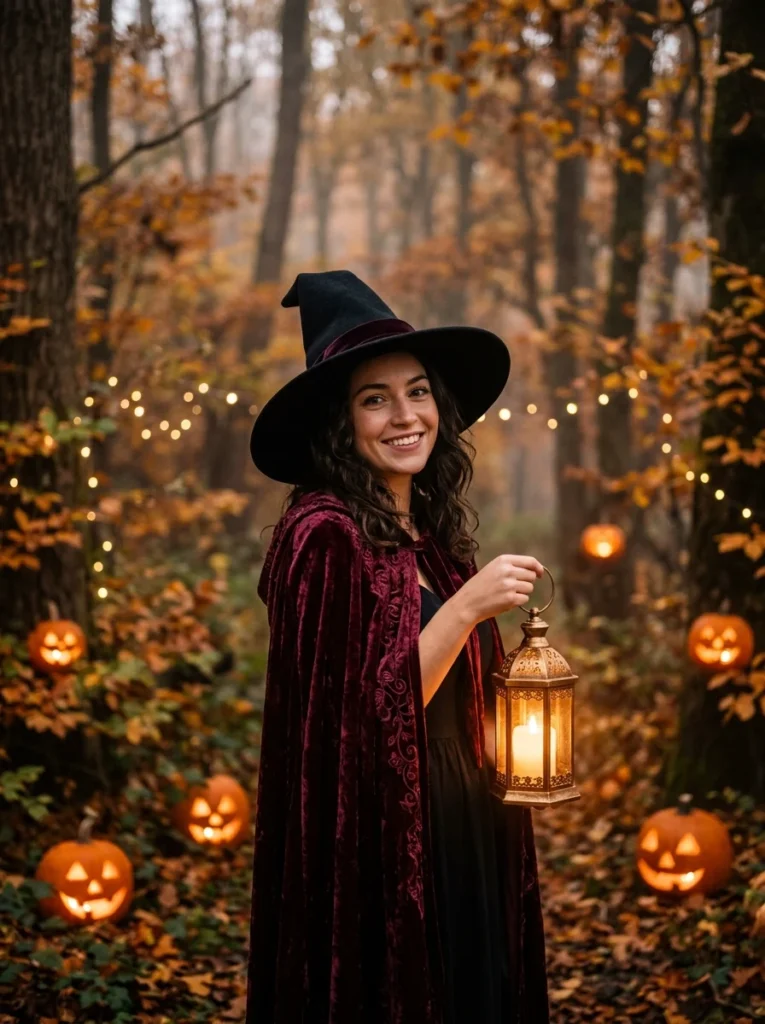
Using the uploaded photo of me, create a cinematic Halloween portrait of me dressed as a [CHOOSE: elegant witch / gothic vampire / friendly scarecrow / pumpkin king / forest fairy].

Keep my face, hairstyle, skin tone and expression exactly as in the photo. Fit the costume naturally to my body with realistic fabric, stitching and props: for a witch, a wide-brimmed black hat, a velvet cloak and a glowing lantern; for a vampire, a high-collared cape with crimson lining; for a scarecrow, a straw hat, patched flannel shirt and burlap details; for a pumpkin king, an autumn-leaf crown and a long orange-and-black robe; for a fairy, moss-green layers and translucent wings.

SETTING: an autumn forest clearing at dusk with soft fog, glowing carved pumpkins on the ground, fallen leaves, bare branches, fairy lights in the trees.
LIGHT: warm candle and lantern light on my face, cool blue dusk behind, gentle rim light, cinematic contrast.
CAMERA: 85 mm portrait lens, shallow depth of field, eye-level, editorial magazine quality, subtle film grain.

Cosy and magical rather than scary. Fully clothed, no gore, no text, no logos.
Short version (for apps with a character limit)
Using my uploaded photo (same face), make a cinematic Halloween portrait of me as a [witch / vampire / scarecrow / pumpkin king / fairy] with a realistic costume, in a foggy autumn forest at dusk with glowing pumpkins and fairy lights, warm lantern light on my face, 85mm shallow depth of field, cosy not scary, no text.
What to avoid (negative prompt)
gore, blood, scary face changes, text, logos, changed face, cheap costume, extra fingers
Remix it: ready-made variations
Pet costume
Using the uploaded photo of my pet, dress my [DOG/CAT] as a tiny wizard with a star-covered hat and cape, sitting among glowing pumpkins on a porch at dusk, same fur colours and face, cosy light, no text.
Family portrait
Using our uploaded family photo, dress everyone as a matching witch family with hats and cloaks in an autumn garden with pumpkins and lanterns, same faces, warm cinematic light, no text.
Movie poster
Using my uploaded photo, create a moody 1980s horror-comedy movie poster style portrait of me as a pumpkin-headed hero holding a lantern, painted illustration style, fog and moon, no title text.
Tips for each AI model
| Model | What to do |
|---|---|
| Nano Banana | Pick one costume per prompt; asking for several at once lowers likeness. |
| ChatGPT Images | If the costume looks cheap, add 'film-quality costume design'. |
| Flux Kontext | Shorten to the short version and add 'preserve identity'. |
How to make it, step by step
- Open your image model. Gemini (Nano Banana), ChatGPT or another image tool that accepts uploads.
- Upload a clear photo. Good light, face visible, no heavy filters.
- Paste the prompt. Change the [BRACKETS] to match you.
- Generate 2–4 versions. Pick the one that looks most like you and re-run with small tweaks.
Posting kit
A caption and hashtags you can use when you share your version.
Didn't buy a costume. Made one with AI 🎃🧙

#Halloween #AIart #halloweencostume #NanoBanana #cozyhalloween #AIphoto #witch #spookyseason
Questions
Which costume works best?
Costumes with clear shapes (hats, capes, crowns) come out best. Busy masks can hide your face, so avoid them.
Can I do my whole family?
Yes, with a clear group photo. Faces are kept best with up to 3–4 people.
Is it free?
Gemini and ChatGPT both offer free image generations with daily limits.