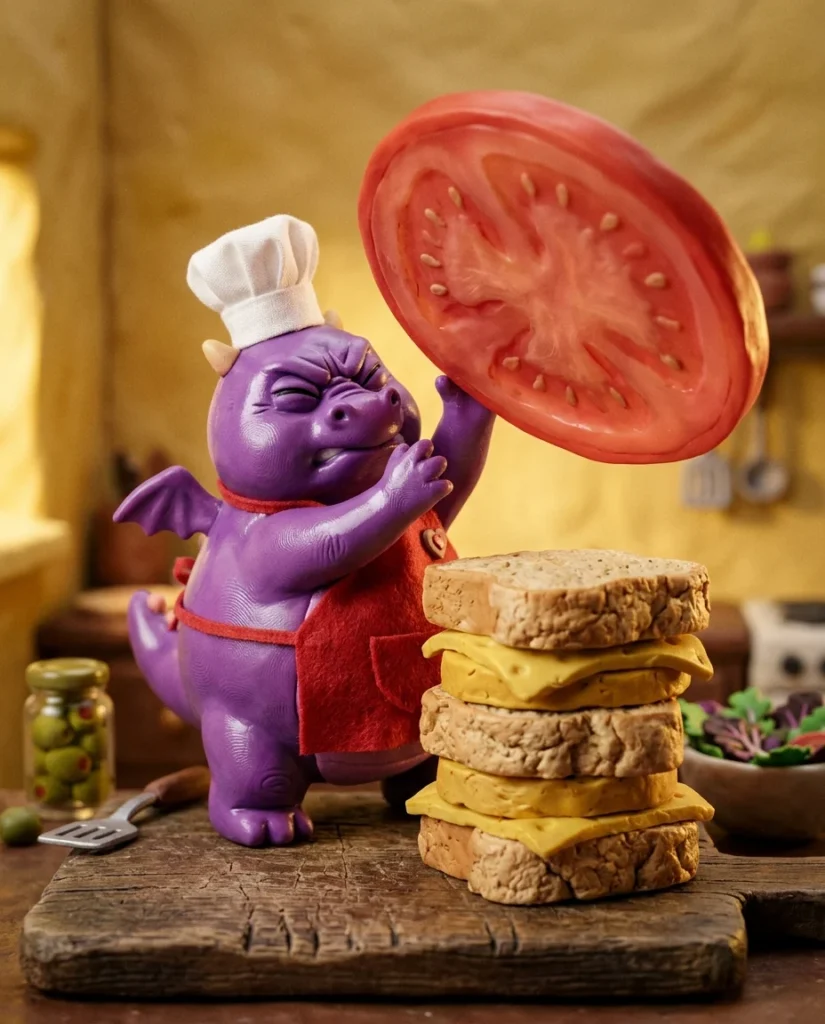
You will make a tactile stop-motion short featuring a round purple dragon in a miniature kitchen. This works because it taps into the nostalgic, handmade feel of the Claymation Lifestyle trend.
Why it is trending
Handcrafted clay aesthetics are huge on social media right now. People love the sensory appeal of fingerprint textures and the choppy, charming movement of stop-motion.
The master prompt
Copy it as it is, or change the parts in [BRACKETS] to make it yours.
A stop-motion claymation short film with a handcrafted, tactile aesthetic. The video features a round, clumsy dragon in a miniature kitchen. The style is inspired by Aardman animations, featuring visible fingerprint textures in the clay, a slight frame-rate jitter to simulate stop-motion, and a saturated, warm color palette.

CHARACTER (The Dragon): A small, spherical purple dragon with a plump belly and tiny, stubby wings. He has two large, blinking golden eyes and two small white horns. He wears a miniature, slightly oversized white fabric chef's hat that occasionally slips over one eye and a tiny red canvas apron tied around his waist. This look remains identical in every shot.

SETTING: A single miniature rustic kitchen set. The background consists of a soft-yellow clay wall with a small wooden shelf holding tiny clay salt shakers. The main action takes place on a thick, weathered wooden cutting board. The geography of the kitchen and the position of the cutting board stay constant throughout the sequence.

CINEMATOGRAPHY: Macro lens with a very shallow depth of field, keeping the dragon and the sandwich in sharp focus while the background is softly blurred. Lighting is warm and directional, simulating a desk lamp from the upper right, creating soft shadows. The camera movement is minimal, using subtle pans and a slow zoom-in during the climax. 24fps with intentional stop-motion stutter.

[00:00-00:04] THE HEAVY LIFT — Close-up shot. The dragon strains, his face turning a darker shade of purple, as he attempts to lift a giant, glistening slice of translucent red clay tomato. He wobbles on his feet, the tomato slice shaking precariously.

[00:04-00:08] THE STACKING — Medium shot. The dragon carefully places the tomato atop a growing tower of clay ingredients: a thick slice of beige bread, a slab of yellow cheese, and a piece of green lettuce. He pats the tomato down with his tiny paws, looking proud.

[00:08-00:12] THE FINAL PIECE — Close-up. The dragon holds a massive, seed-covered clay bun. He slowly lowers it onto the peak of the sandwich. As the bun touches the top, the entire structure begins to lean slowly to the left.

[00:12-00:16] THE COLLAPSE — Wide shot. The sandwich reaches a tipping point and collapses in slow motion. The clay ingredients squish and slide over each other. The dragon looks up with wide eyes just as the entire pile falls directly on top of him.

[00:16-00:20] THE PAYOFF — Static shot. Only a pile of colorful clay lettuce and bread remains where the dragon stood. A small, purple clay tail pokes out from under the pile and wiggles once, then twice, before going still.

SOUND: Ambient sounds of a quiet kitchen. Squishy, tactile 'plop' and 'splat' sounds for the clay movements. A tiny, high-pitched dragon grunt of effort. A slow-motion 'whoosh' as the sandwich falls, ending with a heavy 'thud' and a soft 'boing' for the tail wiggle. No music, just foley.

RULES: No text overlays. No logos. Consistent character design and wardrobe. Realistic clay physics with slight deformation. No morphing limbs.
Short version (for apps with a character limit)
Stop-motion claymation, 24fps, tactile fingerprint textures. A round purple dragon in a white chef hat and red apron in a miniature kitchen. He struggles to build a massive clay sandwich. Macro lens, shallow depth of field, warm studio lighting. [00:00-00:12] Dragon carefully stacks a giant tomato, cheese, and lettuce. [00:12-00:20] The sandwich collapses in slow motion, burying the dragon, leaving only his purple tail wiggling from under a pile of clay lettuce. High saturation, Aardman style.
Shot-by-shot storyboard
- 00:00-00:04
The Heavy Lift
Close-up of the dragon straining to lift a giant red clay tomato slice.
- 00:04-00:08
The Stacking
Medium shot of the dragon adding the tomato to a tower of clay bread and cheese.
- 00:08-00:12
The Final Piece
Close-up as the dragon places the top bun, causing the sandwich to tilt.
- 00:12-00:16
The Collapse
Wide shot of the sandwich falling in slow motion and burying the dragon.
- 00:16-00:20
The Payoff
Static shot of the clay pile with a purple tail wiggling from underneath.
Keep the characters consistent
Paste this description into every clip so the character looks the same from shot to shot.
The Dragon: Small, spherical purple dragon, plump belly, stubby wings, blinking golden eyes, two small white horns. Wears a white fabric chef's hat and a tiny red canvas apron.
Sound and music
Tactile foley: squishy clay plops, a tiny grunt, a slow-motion whoosh, a heavy thud, and a final soft boing sound for the tail.
What to avoid (negative prompt)
morphing faces, extra limbs, text, watermark, smooth 3D render, CGI look, photorealistic human, logo, fast motion, fluid animation
Remix it: ready-made variations
Pizza Disaster
Same style and character. The dragon attempts to slide a giant clay pizza into a miniature oven. The pizza is too wide and gets stuck, eventually snapping in half and covering the dragon in clay cheese.
Cake Chaos
Same style and character. The dragon frosts a three-tier clay cake. He tries to place a single cherry on top, but the weight causes the cake to slide sideways and flatten him.
Pancake Flip
Same style and character. The dragon tries to flip a massive clay pancake. The pancake sticks to the ceiling and then falls back down, trapping him like a blanket.
Tips for each AI model
| Model | What to do |
|---|---|
| Sora 2 | Use the phrase 'stop-motion jitter' and 'hand-animated' to ensure the AI doesn't make the movement too smooth. |
| Kling 2.5 | Emphasize 'fingerprint textures' and 'clay deformation' to get the tactile, physical feel. |
| Veo 3.1 | Specify 'macro photography' and 'shallow depth of field' to lock in the miniature scale. |
How to make it, step by step
- Visual Style Generate a few still images of the purple dragon in his chef gear to lock in the character design.
- Video Generation Input the master prompt into your chosen video AI, ensuring the 'stop-motion' keyword is prominent.
- Timing Adjustment If the motion is too fluid, use a video editor to drop the frame rate to 12 or 15fps.
- Sound Design Add squishy foley sounds to match the clay movements for a satisfying sensory experience.
Posting kit
A caption and hashtags you can use when you share your version.
A tiny chef with a big appetite for chaos. 🐉🥪

Array
Questions
How do I stop the AI from making it look like a smooth 3D animation?
Use keywords like 'stop-motion jitter', '24fps stop-motion', and 'handcrafted clay'. Specifically mentioning 'fingerprint textures' helps the AI understand this is a physical object, not a digital render.
What if the dragon's clothes change between shots?
Mention the 'identical wardrobe' in every prompt segment. If using a tool with image-to-video, use the same character reference image for every clip.
How can I make the sandwich collapse look more realistic?
Describe the clay as 'squishing' and 'sliding'. Use the term 'clay deformation' to tell the AI that the objects should change shape rather than just falling like rigid blocks.